
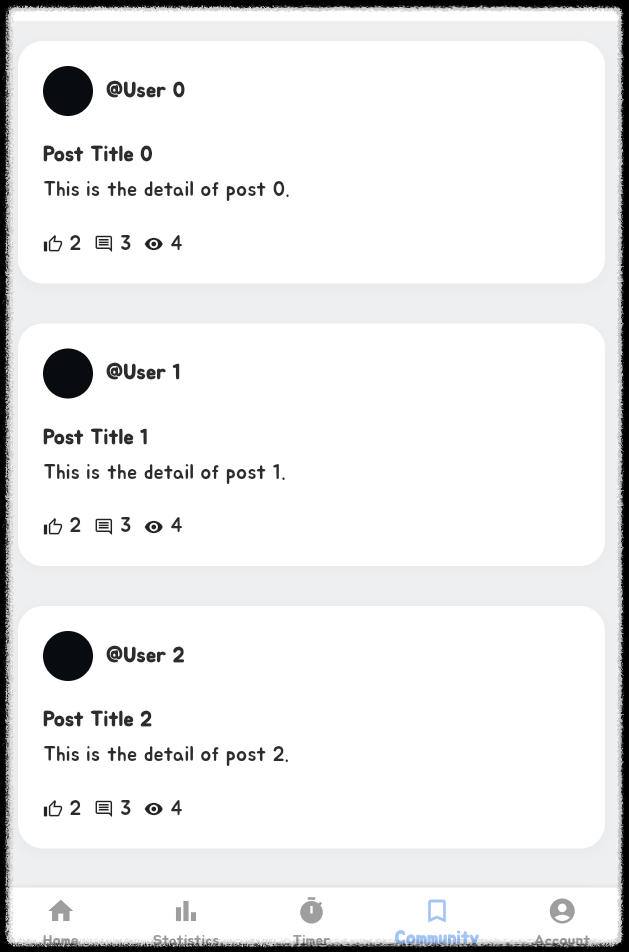
List 뿌릴때 자주 쓴다는 ListView.builder 를 사용했습니다.
코드는 크게 별 것 없습니다. 그냥 ui만 그려주는거라서
Padding(
  padding: const EdgeInsets.all(16.0),
  child: Container(
    padding: EdgeInsets.all(20.0),
    decoration: BoxDecoration(
      color: Colors.white,
      borderRadius: BorderRadius.circular(20.0),
      boxShadow: [
        BoxShadow(
          color: Colors.grey.withAlpha(16),
          spreadRadius: 2,
          blurRadius: 5,
          offset: Offset(0, 3),
        ),
      ],
    ),
    child: Column(
      children: [
        Row(
          children: [
            Row(
              children: [
                CircleAvatar(backgroundColor: Colors.blueGrey),
                SizedBox(width: 10),
                Text(
                  '@User $index',
                  style: TextStyle(fontWeight: FontWeight.bold),
                ),
              ],
            ),
          ],
        ),
        SizedBox(height: 20),
        Row(
          children: [
            Text(
              'Post Title $index',
              style: TextStyle(
                fontSize: 16,
                fontWeight: FontWeight.bold,
              ),
            ),
          ],
        ),
        SizedBox(height: 5),
        Row(children: [Text('This is the detail of post $index.')]),
        SizedBox(height: 20),
        Row(
          children: [
            Icon(Icons.thumb_up_alt_outlined, size: 16),
            SizedBox(width: 5),
            Text('2'),
            SizedBox(width: 10),
            Icon(Icons.comment_outlined, size: 16),
            SizedBox(width: 5),
            Text('3'),
            SizedBox(width: 10),
            Icon(Icons.remove_red_eye_sharp, size: 16),
            SizedBox(width: 5),
            Text('4'),
          ],
        ),
      ],
    ),
  ),
)
여기에 클릭하면 이벤트를 주고 싶으니.. 아래 child 쪽 Column 에 InkWell을 주도록 하겠습니다.
Padding(
  padding: const EdgeInsets.all(16.0),
  child: Container(
    padding: EdgeInsets.all(20.0),
    decoration: BoxDecoration(
      color: Colors.white,
      borderRadius: BorderRadius.circular(20.0),
      boxShadow: [
        BoxShadow(
          color: Colors.grey.withAlpha(16),
          spreadRadius: 2,
          blurRadius: 5,
          offset: Offset(0, 3),
        ),
      ],
    ),
    child: InkWell(
      onTap: () {
        print('Post $index tapped');
      },
      child: Column(
        children: [
        	...
        ],
      ),
    ),
  ),
);
클릭할 때 마다 Post ? tapped 가 뜰겁니다.
여기서 전에 만들었던 Post Model 과 List를 사용하여 게시글을 뿌려주기로 결정.
  final List<Post> posts = [
    Post(
      id: '1',
      userName: 'pizza_lover_kim',
      title: '오늘 처음으로 홈메이드 피자 만들어봤어요 🍕',
      content:
          '도우부터 직접 만들었는데 생각보다 어렵지 않더라고요! 토핑은 페퍼로니, 버섯, 올리브 넣었습니다. 다음엔 불고기 피자 도전해볼게요 ㅎㅎ',
      createdAt: DateTime.now().subtract(Duration(hours: 2)),
    ),
    Post(
      id: '2',
      userName: 'dev_john',
      title: 'Flutter 공부 시작한 지 한 달 됐습니다',
      content:
          '백엔드 개발자인데 앱 개발도 해보고 싶어서 시작했어요. Hot Reload 기능이 진짜 편하네요. 첫 앱 출시가 목표입니다!',
      createdAt: DateTime.now().subtract(Duration(hours: 5)),
    ),
    Post(
      id: '3',
      userName: 'travel_jane',
      title: '제주도 3박4일 여행 다녀왔어요 ✈️',
      content:
          '성산일출봉에서 본 일출이 정말 감동적이었습니다. 흑돼지 백반도 맛있었고, 카페 투어도 재밌었어요. 사진 너무 많이 찍어서 정리가 힘들어요 ㅋㅋ',
      createdAt: DateTime.now().subtract(Duration(hours: 8)),
    ),
    Post(
      id: '4',
      userName: 'fitness_mike',
      title: '오랜만에 운동 시작했는데 온몸이 아파요 😭',
      content:
          '작심삼일이 될까 걱정되지만 이번엔 꼭 3개월은 해보려고요. PT 끊었는데 트레이너님이 너무 빡세게 시켜서... 그래도 뿌듯합니다!',
      createdAt: DateTime.now().subtract(Duration(hours: 12)),
    ),
    Post(
      id: '5',
      userName: 'cat_mom_emily',
      title: '고양이가 새벽 3시에 날 깨워요',
      content:
          '밥그릇이 비었다고 야옹야옹 울어대는데 정말 잠이 안 와요. 자동급식기 사는 게 나을까요? 집사 분들 조언 부탁드립니다 🐱',
      createdAt: DateTime.now().subtract(Duration(hours: 15)),
    ),
    Post(
      id: '6',
      userName: 'drama_addict',
      title: '요즘 핫한 드라마 추천 좀 해주세요',
      content: '넷플릭스 구독했는데 뭘 봐야 할지 모르겠어요. 스릴러나 미스터리 장르 좋아합니다. 코멘트로 추천 부탁드려요!',
      createdAt: DateTime.now().subtract(Duration(days: 1)),
    ),
    Post(
      id: '7',
      userName: 'fresh_graduate',
      title: '드디어 첫 월급 받았습니다! 🎉',
      content:
          '신입으로 입사한 지 한 달 만에 첫 급여 받았어요. 부모님께 용돈 드리고, 저축도 시작할 예정입니다. 뿌듯하네요 ㅎㅎ',
      createdAt: DateTime.now().subtract(Duration(days: 1, hours: 3)),
    ),
    Post(
      id: '8',
      userName: 'healthy_lifestyle',
      title: '다이어트 한 달 만에 5kg 감량 성공!',
      content:
          '간헐적 단식이랑 운동 병행했어요. 저녁은 샐러드만 먹고, 아침 점심은 자유롭게 먹었습니다. 목표까지 10kg 남았어요 파이팅!',
      createdAt: DateTime.now().subtract(Duration(days: 1, hours: 8)),
    ),
    Post(
      id: '9',
      userName: 'coffee_dreamer',
      title: '혼자 카페 창업 준비 중입니다',
      content:
          '직장 다니다가 꿈을 이루기 위해 퇴사했어요. 바리스타 자격증도 땄고, 이제 인테리어 준비 중입니다. 응원 부탁드려요 ☕',
      createdAt: DateTime.now().subtract(Duration(days: 2)),
    ),
    Post(
      id: '10',
      userName: 'bookworm_alice',
      title: '책 읽는 습관 만들기 도전 중',
      content:
          '올해 목표가 50권 읽기인데 아직 10권밖에 못 읽었어요. 요즘 읽고 있는 책은 "아몬드"입니다. 여러분은 몇 권 읽으셨나요?',
      createdAt: DateTime.now().subtract(Duration(days: 2, hours: 5)),
    ),
    Post(
      id: '11',
      userName: 'puppy_parent',
      title: '강아지 입양 고민 중이에요 🐕',
      content: '혼자 사는데 강아지 키우기 괜찮을까요? 낮에는 출근해야 해서 걱정이 됩니다. 경험 있으신 분들 조언 부탁드려요!',
      createdAt: DateTime.now().subtract(Duration(days: 2, hours: 10)),
    ),
    Post(
      id: '12',
      userName: 'tokyo_wanderer',
      title: '일본 여행 가고 싶다...',
      content:
          '도쿄 교토 오사카 다 가보고 싶은데 언제쯤 갈 수 있을까요. 여행 자금 모으는 중입니다. 일본 여행 꿀팁 있으면 공유 부탁드려요!',
      createdAt: DateTime.now().subtract(Duration(days: 3)),
    ),
  ];
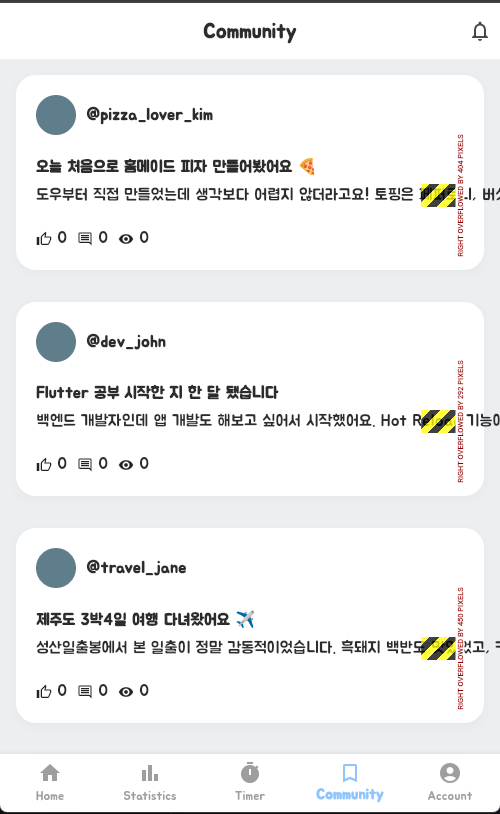
일단 List 를 결합하여 다음과 같이 만들었습니다.
ListView.builder(
	// 포스트 List의 길이
	itemCount: posts.length,
    // posts를 index로 가져옴
    itemBuilder: (BuildContext context, int index) {
    	 final post = posts[index];
    });
)
( ai 돌려서 더미데이터 만들어 달라하는게 최고 인 것 같아요 )
예전엔 일일이 더미데이터 머리속으로 짜내면서 만들곤 했는데 이젠 리얼리티하게 만들어주니.. !
저렇게 만들고 보니 생각보다 만족스럽네요.
다만 문제가 있다면, Row가 넘쳐서 화면 밖으로 나가면서 ERROR를 뱉어낸다는 것.
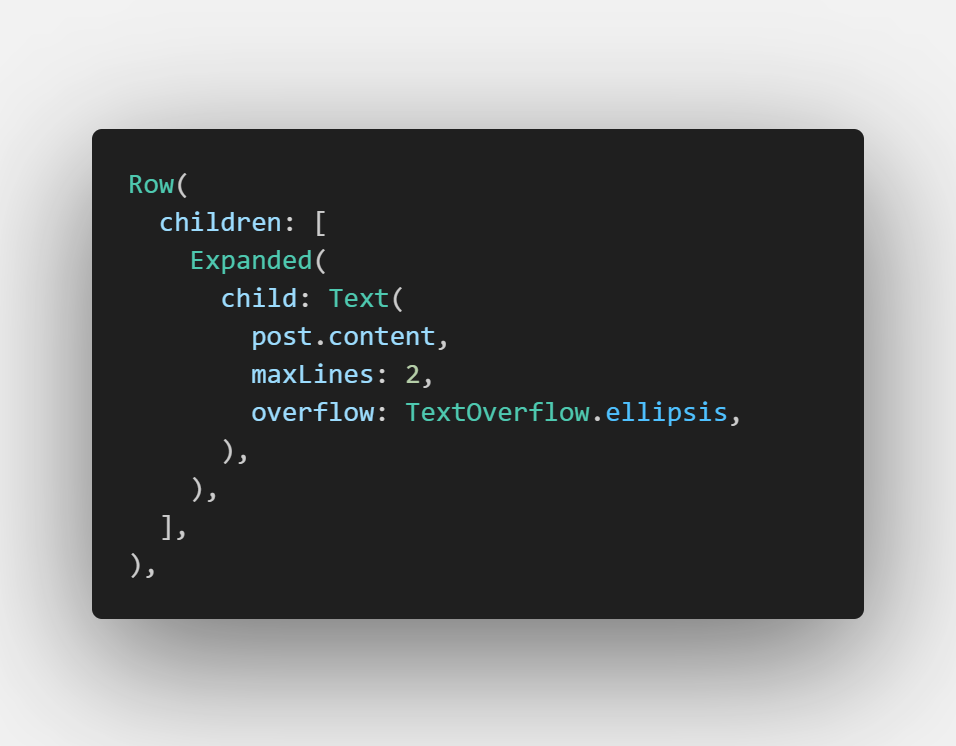
이 문제를 해결하기 위해선, Row 안에 Text 쪽에 maxLines 랑 overflow를 넣으면 된다고 함.

이렇게 했는데도 해결이 되지 않음..
그래서 Text위에 Expended 넣으니 해결이 되었습니다.
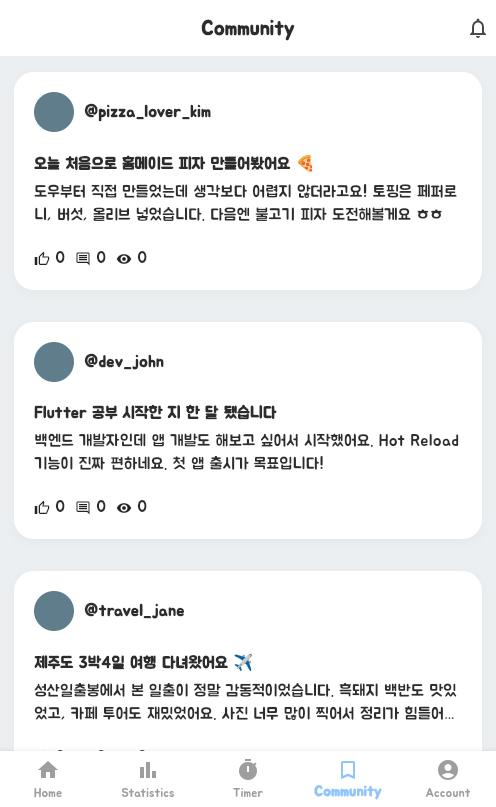
여기까지 하고 차후.. 계속 포스팅 하며 이어갈 예정입니다.
'지나온 흔적' 카테고리의 다른 글
| [ React ] 컴포넌트 명명, 파일 명 등등 (0) | 2026.02.19 |
|---|---|
| [ github ] 깃허브 commit 되돌리기 (0) | 2025.10.30 |
| [ Flutter ] Text 화면 넘침 + ellipsis 처리 (0) | 2025.10.22 |
| [ flutter ] 냥이월드 - KakaoUser 로그인 이후 load 이슈?!?! (0) | 2025.10.15 |
| Flutter Kakao Login ( 임시 - 진행중 ) (0) | 2025.10.13 |